link me!
CT!


Selling at!



Stormlight on FB

oh, the places you'll go!










my PSP homes




Showing posts with label Alphas by Sue. Show all posts
Showing posts with label Alphas by Sue. Show all posts
Thursday, October 19, 2017

NOTE: you MAY link to this tut. you MAY print it out for later use offline. you MAY NOT claim it as yours or take anything else from it. this tutorial is ©Ruby/Stormlight, written October 18, 2017.
Supplies needed:
-- PSP
-- main tube of choice. I am using a tube by Mariel that is part of S&CO's Dead Bride Night Collab part two. Each part of the collab is FREE with purchase of $13.50 or more and you can get part here.
-- scrap kit of choice. I am using a kit by FwTags Creations, also part of this collab pack.
-- template of choice. I am using Template #17 by Melissa.
-- mask of choice. I am using a mask by Vaybs.
-- the plugins EyeCandy Bevel Boss, Corona and Gradient Glow.
-- font or alpha of choice. I am using an alpha by Designs by Sue that is part of the collab pack.
Wednesday, September 27, 2017

NOTE: you MAY link to this tut. you MAY print it out for later use offline. you MAY NOT claim it as yours or take anything else from it. this tutorial is ©Ruby/Stormlight, written September 26, 2017.
Supplies needed:
-- PSP
-- main tube of choice. I used the tube Catrina II by Alehandra Vanhek. You can purchase her here.
-- scrap kit of choice (I used a fabulous kit by Tagcatz called Day of the Dead. you can find this kit here.)
-- mask of choice. I am using a mask by Kris.
-- the plugin EyeCandy Gradient Glow.
-- font or alpha of choice. I am using the alpha Dark Roses by Designz by Sue, which you can purchase here.
Friday, June 23, 2017

NOTE: you MAY link to this tut. you MAY print it out for later use offline. you MAY NOT claim it as yours or take anything else from it. this tutorial is ©Ruby/Stormlight, written June 22, 2017.
Supplies needed:
-- PSP
-- main tube of choice. I am using Heart Chic by Andy Cooper. She is available to purchase here.
-- scrap kit of choice. I am using the beautiful match kit by Tagcatz Design, which you can purchase here.
-- template of choice. I used FB Template #16 by Millie. You can get all her awesome timeline templates here.
-- the plugins Eye Candy Gradient Glow.
-- alpha or font of choice. I am using a beautiful alpha by Designz by Sue, Diabla, which you can purchase here.
Wednesday, December 21, 2016

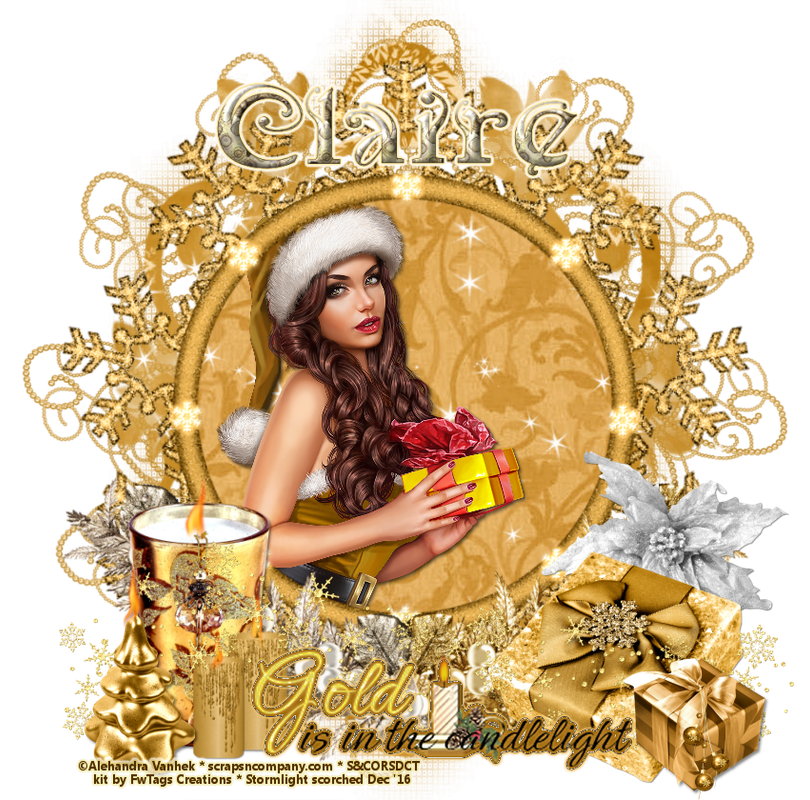
Christmas elegance comes personified in Alehandra Vanhek's beautiful "Christmas Gift 2" tube, a beautiful brunette who is dressed in a golden velvet Santa-style gown and carrying a brightly wrapped gift. She comes in three versions (two with hat, one without). I have paired her with a wonderful kit by FwTags Creations, "Christmas Gold", which includes 5 papers, 5 frames and 70 elements in a palette of golds and silvers, with accents of silver-gold, green and white, perfect for dazzling up your holiday tags. I've also used a great alpha by Designz by Sue, "Christmas Girl", which comes in two versions. You can purchase the tube here, kit here and alpha here.

Friday, July 29, 2016

NOTE: you MAY link to this tut. you MAY print it out for later use offline. you MAY NOT claim it as yours or take anything else from it. this tutorial is ©Ruby/Stormlight, written July 28, 2016.
Supplies needed:
-- PSP
-- main tube of choice. I am using Pamela Summers by Vi Nina. You can purchase her here.)
-- scrap kit of choice (I used the made to match kit by Disturbed Scraps, which you can find here.)
-- template of choice. (I'm using a template by Designz by Ali.)
-- mask of choice. (I am using mask 90 by Rissa.)
-- [optional] texture(s) of choice. (I am using a texture by spooky-window, which you can find at deviantart.)
-- the plugins Mura Meister Copies and Eye Candy Gradient Glow.
-- font or alpha of choice. I am using the alpha "Windy City" by Designz by Sue, which you can purchase here.
Wednesday, July 20, 2016
Get colorful for summer with S&CO's awesome Summer Splash collab package. The collab has an awesome palette of hot pink, juicy orange, sea greens, bright and dark purples and lighter green and light blue accents and includes tubes by Lysisange and Lil Mz's Brainstorms, kits by several of our talented designers and some very cute CU goodies as well! The collab is free with a purchase of $12.50 or more.
Below are tag designs that showcase some of the products available in the collab [tube by Lysisange, kit by Bibi's Collection].


Also here are some bonus snags for your use! You can collect them all here!


Also here are some bonus snags for your use! You can collect them all here!


Saturday, May 7, 2016
If you love angels, the Heaven collab will make a great addition to your tagging supplies. This new collab by Scraps N Company includes lovely tubes by Andy Cooper and Lil Mz's Brainstorms, kits by many of our talented artists and some extra goodies perfect for all things heavenly. You can purchase the collab here.
Below are tag designs that showcase some of the products available in the collab.


Friday, May 29, 2015

NOTE: you MAY link to this tut. you MAY print it out for later use offline. you MAY NOT claim it as yours or take anything else from it. this tutorial is ©Ruby/Stormlight, written May 29, 2015.
Supplies needed:
-- PSP
-- main tube of choice. I used Megan by Carpe Diem. You can purchase her here.
-- scrap kit of choice (I used a beautiful match kit by Designs by Joan of the same name, which you can get here.)
-- template of choice. I am using an awesome template by Millie (#762), which you can get here.
-- mask of choice. I am using a mask by weescotslass. she has tons of masks at her blog.
-- the plugins Mura Meister, Tramages and Alien Skin Xenofex 2.
-- alpha or font of choice. I am using the alpha Last Night by Designz by Sue, which you can purchase here.
Monday, May 4, 2015

NOTE: you MAY link to this tut. you MAY print it out for later use offline. you MAY NOT claim it as yours or take anything else from it. this tutorial is ©Ruby/Stormlight, written May 3, 2015.
Supplies needed:
-- PSP
-- main tube of choice. I used Andy Cooper's Sexy Guitar, which you can purchase here.
-- scrap kit of choice (I used the made-to-match kit by Lizquis Scraps. you can purchase it here.)
-- mask of choice. I used mask #70 by ButterflyFlutterby. you can find lots of great masks by her at her blog.
-- the plugins Eye Candy and Alien Skin Xenofex.
-- alpha or font of choice. I am using a great alpha by Designz by Sue called "Sexy Craziness" which you can purchase here.
It's time to create!
Thursday, April 30, 2015

NOTE: you MAY link to this tut. you MAY print it out for later use offline. you MAY NOT claim it as yours or take anything else from it. this tutorial is ©Ruby/Stormlight, written April 29, 2015.
Supplies needed:
-- PSP
-- main tube of choice. I used Audrey by Ishika Chowdhury. You can purchase her here.
-- scrap kit of choice (I used a great made-to-match kit by Disturbed Scraps. you can get this kit here.)
-- mask of choice. I am using a mask by Brutal Designs.
-- the plugin EyeCandy Gradient Glow.
-- alpha or font of choice. I am using the alpha "Ellen" by Designz by Sue. you can purchase this alpha here.
Now, let's create!
Monday, November 24, 2014
Last week marked the first anniversary for Scraps N Company! Right now they have TWO absolutely wonderful Anniversary Collabs up for grabbing. If you spent a total of $10 on anything in the store, you can choose one of the collabs as a FREE gift. And each collab is PACKED with tons of great goodies, including tubes, scrap kits, alphas and even some CU items!
Below are some tags designed with materials from Collab #2, which you can grab here (or if you're interested in Collab #1, you can find it here.)
Below are some tags designed with materials from Collab #2, which you can grab here (or if you're interested in Collab #1, you can find it here.)

Anniversary Girl
[tube by Tammy's Welt, scrap kit by Mariel Design, template by KanDee]
[tube by Tammy's Welt, scrap kit by Mariel Design, template by KanDee]

Glam Star
[tube by Di Halim, scrap kit by ChaChaz Creationz]

The Birthday Girl
[tube by Danny Lee, scrap kit by Kai Kreations, alpha by Sue]
[tube by Danny Lee, scrap kit by Kai Kreations, alpha by Sue]
Monday, September 8, 2014

NOTE: you MAY link to this tut. you MAY print it out for later use offline. you MAY NOT claim it as yours or take anything else from it. this tutorial is ©Ruby/Stormlight, written September 7, 2014.
Supplies needed:
-- PSP
-- main tube of choice (I used a lovely new tube by LeEVart.)
-- PSP
-- main tube of choice (I used a lovely new tube by LeEVart.)
-- template of choice. (Millie has tons of great Facebook cover templates. check out her blog for the selection! for this tut, I chose cover template #47)
-- the plugin Tramages.
-- a small tube or two. I used the basic pinwheel bronze that comes with PSP.
-- the plugin Tramages.
-- a small tube or two. I used the basic pinwheel bronze that comes with PSP.
-- Jazzy's "basic" drop shadow setting of 2, 2, 50, 3 and color black.
-- alpha or font of choice. I used a great alpha by Designz by Sue called Capricornia. you can purchase this and tons of Sue's other alphas at S&CO.
-- alpha or font of choice. I used a great alpha by Designz by Sue called Capricornia. you can purchase this and tons of Sue's other alphas at S&CO.
Sunday, February 23, 2014

Supplies needed:
-- PSP
-- main tube of choice. I used Pandora-Creations' gorgeous "Kate", which can be purchased at S&CO.
-- photo of choice. I used one of my own photos, but there are many great free to use stock photos at sites like morguefile and stock.xchng.
-- template of choice. I used a template by Ali.
-- gradients of choice. I used two default gradients that came with PSP and one by MsKris.
-- the plugins Visman and EyeCandy 4000.
-- Jazzy's "basic" drop shadow setting of 2, 2, 50, 3 and color black.
-- mask of choice. I used a mask by Wynter.
-- alpha or font of choice. I used a lovely alpha by Designz by Sue, called the "Fancy Pants Alpha". you can also purchase this alpha at S&CO.
Sunday, February 2, 2014

NOTE: you MAY
link to this tut. you MAY print it out for later use offline. you MAY NOT claim
it as yours or take anything else from it. this tutorial is ©Ruby/Stormlight,
written January 8, 2014.
Supplies needed:
-- PSP
-- main tube of choice (I used Ciaran by Aguila Dorado. you can purchase him at S&CO.)
-- scrap kit
"Sexy Vamp" by Designs by Joan. you can also purchase this kit here.
-- the plugin
EyeCandy 4000 (Gradient Glow).
-- Jazzy's "basic" drop shadow setting of 2, 2, 50, 3 and color black.
-- mask of choice. I used a mask by Kris.
-- font or alpha of choice. I used an alpha by Sue.
-- Jazzy's "basic" drop shadow setting of 2, 2, 50, 3 and color black.
-- mask of choice. I used a mask by Kris.
-- font or alpha of choice. I used an alpha by Sue.
Monday, January 13, 2014

NOTE: you MAY
link to this tut. you MAY print it out for later use offline. you MAY NOT claim
it as yours or take anything else from it. this tutorial is ©Ruby/Stormlight,
written January 13, 2014.
Supplies needed:
-- PSP
-- main tube of choice (I used Pandora's phenomenal Black Fire Angel. You can purchase her at Scraps N Company.)
-- made-to-match scrap kit of the same name by Bibi. you can also purchase this kit here.
-- the plugin
EyeCandy 4000 (Gradient Glow).
-- Jazzy's "basic" drop shadow setting of 2, 2, 50, 3.
-- template of choice. I used a great template by Ali.
-- mask of choice. I used a mask by Tonya.
-- alpha or font of choice. for this tutorial, I am using the Black Fire alpha created by Sue, which was made to match this tube and kit. you can purchase this alpha here.
Thursday, January 9, 2014

NOTE: you MAY
link to this tut. you MAY print it out for later use offline. you MAY NOT claim
it as yours or take anything else from it. this tutorial is ©Ruby/Stormlight,
written January 8, 2014.
Supplies needed:
-- PSP
-- main tube of choice (I used a gorgeous girl by Di_Halim. You can purchase her at Scraps N Company.)
-- scrap kit
"Dragon Girl" by Lizquis Scraps. you can also purchase this kit here.
-- the plugins
EyeCandy 4000 and Dynasty.
-- Jazzy's "basic" drop shadow setting of 2, 2, 50, 3.
-- mask of choice. i used a mask by Uchy.
-- alpha or font of choice. for this tutorial, I am using a fun Scrap Metal alpha created by Sue. you can purchase this alpha here.
Let's get creating!
-- Jazzy's "basic" drop shadow setting of 2, 2, 50, 3.
-- mask of choice. i used a mask by Uchy.
-- alpha or font of choice. for this tutorial, I am using a fun Scrap Metal alpha created by Sue. you can purchase this alpha here.
Let's get creating!
Subscribe to:
Posts
(Atom)
CU licenses